
Monitoring systems with ping
Il monitoraggio sistemi tramite ping permette di verificare la raggiungibilità di un host su una rete Internet Protocol (IP). Funziona inviando messaggi di richiesta di echo al host di destinazione tramite Internet Control Message Protocol (ICMP) e ascoltando le risposte di echo. Questo processo consente allo strumento di monitoraggio di misurare il tempo di andata e ritorno di un messaggio dalla sorgente alla destinazione e viceversa, fornendo informazioni sulla latenza e sulla disponibilità del host.
There are several products both software and hardware on the market that allow monitoring of systems by sending ping packets, on our site you can find for example theIP WatchDog2 - Ping Restarter which is able to perform hardware restart of a system in case of an error on receiving the response to the ping message.
But it may be the case that the need for monitoring does not involve just restarting the device, but necessitates the execution of dedicated ancillary operations that then necessarily need to be programmed according to one's needs. Here, then, is where the use of a programmable system such as the PLC SlimLine allows you to implement your own monitoring system via ping. Through PLC programming with the free tool LogicLab using the 5 languages of IEC-61131-3, it is possible to build your own monitoring system.
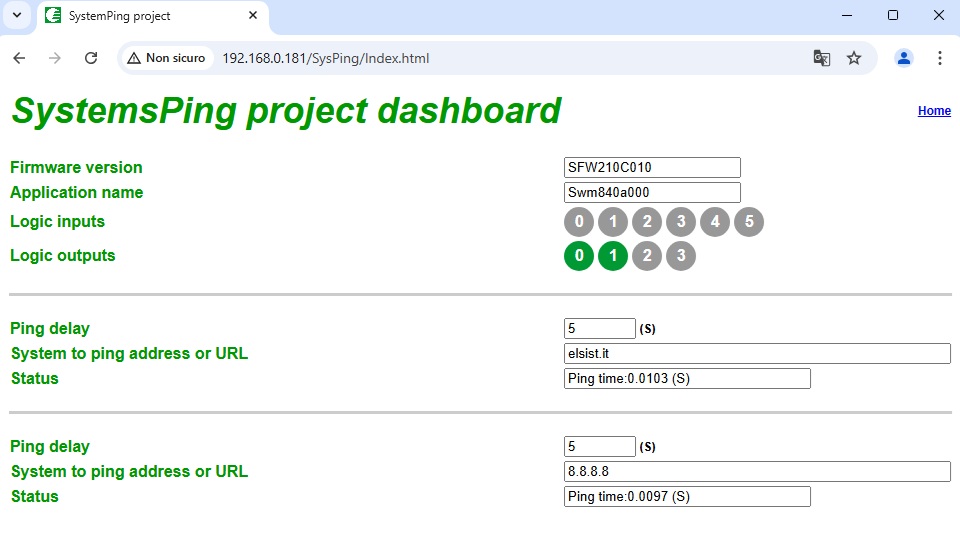
In the library provided with Logiclab you can find the FB SysPing which allows you to handle ICMP ping packets, the integrated web server allows you to realize configuration web pages, and through the programming language it is possible to handle all the sequences necessary for error handling. It is available for the download the program SystemsPing, in the folder you will find the LogicLab program and the folder Web\SysPing with the web page to be transferred to the C:\Web Of the system.
E se il ping non è sufficiente?
Può capitare che per monitorare il funzionamento di un sistema non sia sufficiente il solo ping, ma sia necessario ad esempio effettuare la richiesta HTPP/s di una pagina e verificarne il ritorno. In questo caso il FB HTTPClient può risolvere il problema. In altri casi è necessario eseguire una richiesta TCP esempio in telnet, ecco allora che i FBs SystTCPClient e CLIClient possono essere di aiuto. Sto solo dando indicazioni sulle varie possibilità offerte dal sistema, ma lascio alla creatività di ognuno la scelta dei blocchi funzioni da utilizzare.